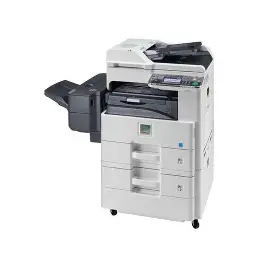
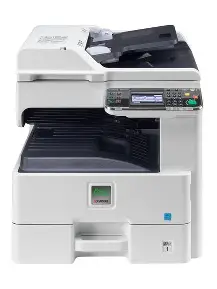
The Kyocera Ecosys FS-6525MFP is a robust A3 black-and-white multifunction copier offering print, scan, and copy functions. With efficient duplex printing, a user-friendly interface, and long-life components, it’s ideal for medium-sized workgroups and businesses.
high workloads while reducing operational costs. With print and copy speeds of up to 25 pages per minute, this model supports efficient two-sided (duplex) printing and scanning, perfect for office productivity.
It comes equipped with a standard 500-sheet paper cassette and a 100-sheet multipurpose tray, expandable to a maximum of 1,600 sheets, allowing flexible media handling for various office needs. The intuitive touchscreen control panel ensures ease of use, and USB and network connectivity allow seamless integration.
Thanks to Kyocera’s ECOSYS technology, the FS-6525MFP delivers low total cost of ownership with long-life components and minimal maintenance requirements.
🔧 Key Features & Specifications
Feature
Details
Print Speed
Up to 25 ppm (A4)
Functions
Print, Copy, Scan
Print Resolution
600 x 600 dpi (up to 9600 x 600 dpi with enhancement)
Duplex Printing
Standard
First Print Time
Approx. 9.2 seconds
Paper Input
500-sheet cassette + 100-sheet multipurpose tray
Max Paper Capacity
1,600 sheets
Paper Sizes
A6 – A3
Connectivity
USB 2.0, Ethernet
Monthly Duty Cycle
Up to 50,000 pages
Toner Yield
~15,000 pages (TK-475)
Dimensions
594 x 624 x 683 mm
Weight
Approx. 51 kg
✅ Why Choose the FS-6525MFP?
Reliable A3 printing, copying, and scanning
Energy-efficient and low maintenance
Long-life components reduce operating costs
Ideal for small to medium-sized businesses
Easy-to-use control panel with fast startup
🔧 Need Installation Help?
Book a professional technician from our Printer Services Page to help you set up or maintain your device.
Reviews
There are no reviews yet.
Be the first to review “Kyocera Ecosys FS-6525MFP Photocopier – A3 Monochrome Multifunction Printer”Cancel Reply

Reviews
There are no reviews yet.